
SVGs and PDFs can both be interactive
Notes from my travels through file formats, June 2026
SVG and PDF both have a rarely-used interactive layer hiding in their specs. SVG in particular can almost host small, fully contained apps. Did you know this? I didn't until somewhat recently, and I haven't found a cohesive treatment of the topic out there. So, here it is.
For some context, I've spent the last few years building Vexlio, a tool for exactly this: authoring and publishing self-contained interactive documents. As a part of my somewhat obsessive nature, I spent a lot of time thinking about how I was going to make Vexlio's interactive documents into things that could be saved and shared. Along the way I learned that two very common formats, PDF and SVG, have a quite uncommonly utilized part of their spec: programmability and interactivity.
You have probably come across an interactive SVG or two, and there are well-known projects out there leveraging interactive SVG as their primary output format (for example, the excellent Flamegraph tool for performance analysis).
I doubt, though, that you've come across an interactive PDF. Not just text fields, but objects that respond to clicks or keystrokes. If you have come across one, you probably didn't know it, because your PDF viewer opened the doc and just omitted the interactive parts.
#Hiding in plain sight
At their simplest, SVG and PDF are both containers for vector-graphics content. SVG uses XML to specify things like "place a red, 50x50 rectangle at position (100,100)." PDF uses an imperative, stateful language derived from PostScript to say things like "switch color to red, place a pen down at position 100,100, drag pen right +100, ...". Different models, same outcome.
At some point, maybe someone asked the same question of each format: how do we add just a little bit of dynamic content, like a tooltip that shows up when you hover your mouse over this text/shape? I like to imagine the response from the engineers in the room was something like, "well, if you really want to go that route..." while privately groaning.
The problem is that "just a little bit" of dynamic content inevitably needs a system that expands into a complex system of animations, timers, event callbacks, hit-testing.... And just such a system was spec'd and bolted on to each format. Let's look at each one separately.
#Interactive SVGs
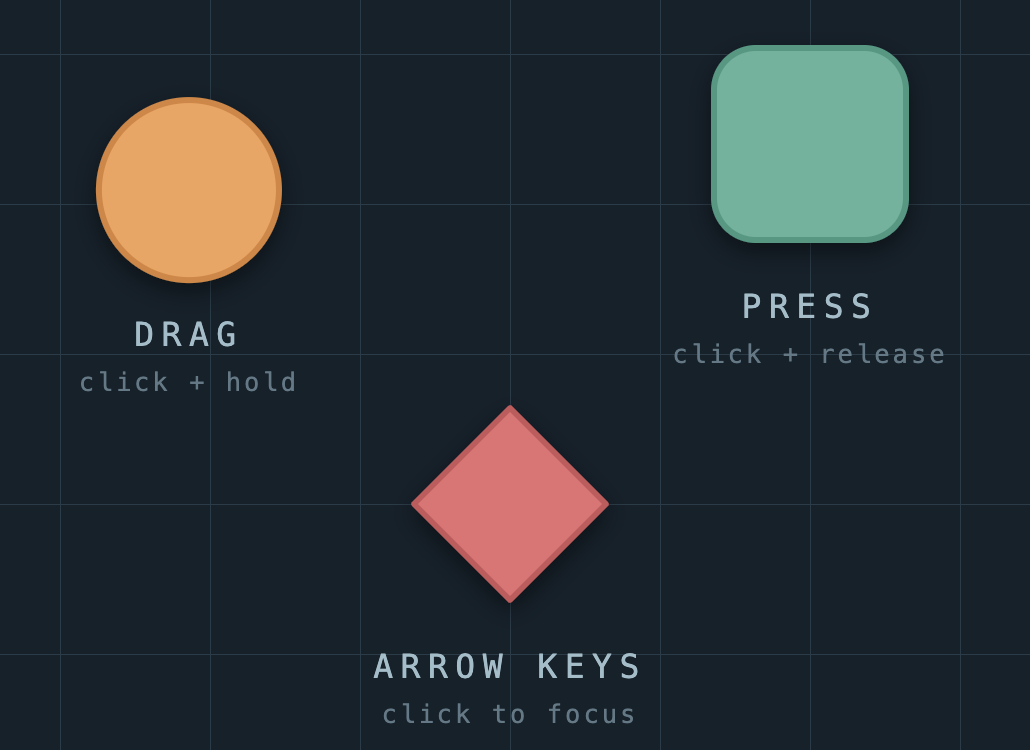
Here's a live example of an interactive SVG:
Click around on the shapes, try dragging your mouse too. You can download the .svg file, and you'll have a stable, interactive document that you can open in your browser, even offline.
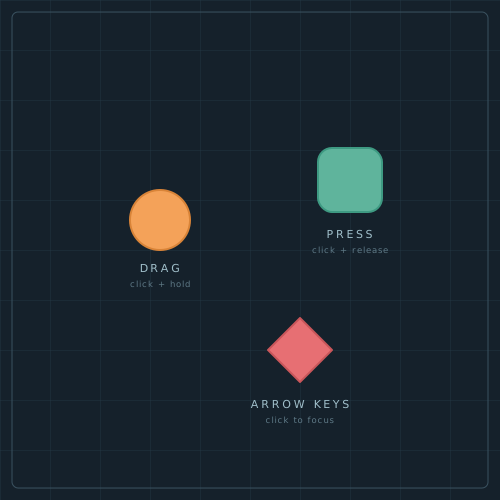
The mechanism driving interactive SVGs is JavaScript embedded in the file, relying on the viewer's JS runtime to route events, run timers, etc. Typically you either associate named identifiers with specific elements in the SVG and reference them by id in the embedded JS, or hook up event handlers with markup in the XML element declarations. The example SVG above uses the reference-by-id approach, e.g.:
<!-- The <g> owns positioning; the circle just owns its look. -->
<g id="dragGroup" transform="translate(160,220)">
  <circle id="dragCircle" cx="0" cy="0" r="30"
          fill="#F4A259" stroke="#D98438" stroke-width="2"/>
</g>
and the embedded script:
const svg = document.querySelector('svg');
const group = svg.getElementById('dragGroup');
const circle = svg.getElementById('dragCircle');

function screenToWorld(e) {
  const pt = svg.createSVGPoint();
  pt.x = e.clientX;
  pt.y = e.clientY;
  return pt.matrixTransform(svg.getScreenCTM().inverse());
}

let dragging = false;
circle.addEventListener('pointerdown', () => dragging = true);
circle.addEventListener('pointerup', () => dragging = false);

circle.addEventListener('pointermove', (e) => {
  if (!dragging) return;
  const { x, y } = screenToWorld(e);
  group.setAttribute('transform', `translate(${x},${y})`);
});
It turns out that this paradigm, a DOM that you can peek and poke at with sidecar scripting, is quite capable (you may have heard of another use of this same paradigm, "the Internet"). Lots of charting libraries, for example, use interactive SVGs as their stable output format. Taken to the extreme, I think you could implement most of a simple app entirely in a single SVG file.
And there's actually another under-utilized (in my opinion, anyway) capability of SVGs when embedded in a web page: they can be manipulated externally as well, and styled by the same CSS as the rest of the site. This opens up a broad avenue of expressiveness, and is one of the real wins for a file format that's easily interoperable with the rest of the web.
#Interactive PDFs
Now for the surprising part: PDFs can technically do (some of) this too. Here's a sample interactive PDF illustrating the point:
If you have Adobe Reader installed, the interactivity will likely work out-of-the-box. You may need to enable some more permissive security settings in Reader in order for it to work. If you're not using Reader, some interactivity may work completely, some may work in a half-broken sort of way, and some interactivity will just plain not work. Here is a brief screencap of the document as viewed with Foxit Reader, showing the full intended behavior:
Underneath, this PDF uses JavaScript to implement its interactivity. Adobe specified, and implemented in Reader, an entire JS API for authors to make use of within their PDF content.
The example above uses this code (approximately) to support dragging the rectangle around:
// Document-level script, runs on open:
var dragActive = false;

// The shape's Mouse-Up action: click to grab / drop.
function onShapeMouseUp() {
  dragActive = !dragActive;
}

// One shared Mouse-Enter action on every invisible grid cell. No "mouse moved"
// event exists, so each cell snaps the shape to itself when the pointer enters:
function onCellMouseEnter() {
  if (!dragActive) return;
  var b = event.target.rect;        // this cell's box
  var cx = (b[0] + b[2]) / 2, cy = (b[1] + b[3]) / 2, h = 20;
  this.getField("shape").rect = [cx - h, cy + h, cx + h, cy - h];
}
and the PS/PDF:
% The draggable shape: a pushbutton field. Its /Rect is what the JS rewrites.
% /AA /U is the Mouse-Up action -- click to toggle grab/drop.
<< /Subtype /Widget /FT /Btn /Ff 65536
   /T (shape) /Rect [200 400 240 440]
   /MK << /BG [0.2 0.4 0.9] >>            % blue fill
   /AA << /U << /S /JavaScript /JS (...onShapeMouseUp body...) >> >> >>

% One invisible grid cell (the drag area is tiled with these).
% No fill = invisible; Mouse-Enter (/E) fires the shared snap action.
<< /Subtype /Widget /FT /Btn /Ff 65536
   /T (cell) /Rect [120 400 180 460]
   /AA << /E << /S /JavaScript /JS (...onCellMouseEnter body...) >> >> >>

% Each widget is listed both in the page's /Annots (to render + receive
% events) and in the catalog's /AcroForm /Fields (to be a named field).
The functions above are shown separately just for readability. In the actual PDF there are no named functions: each
one's body is inlined directly into the corresponding action's /JS string (the
(...onShapeMouseUp body...) and (...onCellMouseEnter body...) placeholders above). Each
invisible grid cell detects when the mouse enters its bounds, and moves the rect to itself.
This is grid-based because PDF's JS APIs do not expose a notion of general mouse tracking. There's no API to answer the question "where is the pointer right now?" and direct manipulation of graphics elements was not an originally intended usecase. Instead, these APIs evolved almost exclusively for form handling.
You can take a small step back in time to read an old version of the PDF spec that discusses this: https://web.archive.org/web/20010605030300/http://partners.adobe.com:80/asn/developer/pdfs/tn/5186AcroJS.pdf. In the FAQ section near the end:
How can I determine if the mouse has entered/left a certain area?
Create an invisible, read-only text field at the place where you want to detect mouse entry or exit. Then attach JavaScripts [sic] to the mouse-enter and/or mouse-exit actions of the field.
The same document also includes this delightfully anachronistic reassurance:
"All date manipulations in JavaScript, including those methods that have been documented in this specification are Year 2000 (Y2K) compliant."Thank goodness!
#Why don't we see more of these?
SVG is a huge, notoriously sprawling spec, and many (most?) viewers don't even implement the full scope of its graphics capabilities, let alone its dynamic features like animations or scripting. If you're writing an SVG viewer, the bulk of your engineering work should rightfully belong to rendering. Shipping an entire JS runtime to support a niche usecase is typically going to be out of the question.
And, even just embedding a JS runtime is not sufficient for simple-on-the-surface features like detecting mouse clicks on a particular shape. You might need to implement OS-specific mouse handling, an event loop, a timer system, a spatial index for hit-testing. The list goes on. Many of these pieces are significant engineering lifts in their own right. Soon you'd be shipping a large fraction of a browser... at which point, why not just tell people to open the SVG in the browser they already have?
Interactive PDFs have a slightly different story. For a long time, PDFs were practically only viewable by Adobe's own Reader software, which was available for free. Their viewer, as seen in the previously-linked spec, did implement JavaScript support through their defined APIs. The problem was, this quickly became a source of security problems, which damaged PDF's reputation as a safe, interoperable format. This blog article has good discussion and background on just some of the security problems with JavaScript-in-PDF.
#The authoring problem
It's not fair to place blame solely on JavaScript's shoulders. After all, websites can clearly execute arbitrary JavaScript safely (mostly) on your computer, so it's not a stretch to say that the functionality could be encapsulated and made portable.
The bigger problem is authoring. There is no shortage of ways to create interactive graphics for the web itself, but the space of tools for authoring PDF and SVG to their fullest capability as standalone docs is quite narrow. I suspect there's a bit of chicken-and-egg going on here: demand for tools is limited because not many realize that this is even possible, so nobody asks for tools to do it, so no one builds the tools that could reveal and popularize the functionality.
Additionally, good authoring tools are harder to create than they may seem. Figuring out what should be exposed in the UI, and how to make it discoverable and usable, is a significant undertaking. Cleanly representing dynamic concepts on a screen that can only show one snapshot-view at a time is challenging.
#AI partially addresses this
Things are shifting on the authoring front. Today you can ask an LLM chatbot like Anthropic's Claude to generate a clickable thing from your written specifications, and it will spit out a working version in a minute or two. This is, in fact, how I created the above SVG and PDF examples. Anthropic's interface even gives you the ability to get a publicly-sharable link to that artifact, so you don't have to worry about hosting or emailing it around.
The trouble, in my somewhat biased opinion, is that content authoring is not generally considered a core competency of the companies building these chatbots. Pinning customer-facing interactive docs, for example, to a Claude-hosted link would make me nervous for its durability. Better results can be achieved by reducing the AI diagram generation task to producing standalone components, although even state-of-the art-models are still prone to producing repetitive graphics.
There is also something to be said for the argument that making visual things by hand (or by mouse) is more convenient than describing the image and the tweaks you want in English. "No, no, I wanted that box to the LEFT of the image but still aligned to the text on the RIGHT side of the other shape" is the kind of arguing with a computer that boils the blood after a little while.
#Concluding thoughts
Even if AI-enabled tools eventually solve the authoring problem, there is still the distribution problem: how do we make these things into long-lived, stable, archivable artifacts? PDF is a good candidate format due to its native support for embedding raster assets, fonts, etc, but it is lacking interactivity APIs that would be necessary for a good experience (e.g. the mouse location issue mentioned earlier). And, scriptable PDFs come with a host of security risks. Barring a new file format, permalinks on the internet seem like the realistic near-term solution.
I have dreams of writing a little compiler that would generate provably-safe interactive documents that could be distributed as a single, self-contained file. I don't have the bandwidth to devote to that pie-in-the-sky, however. If this type of thing interests you, or if you'd like to work with me on problems like this, drop me a line!
That's all for now; back I go to Vexlio.

Launches in your browser, no sign in required.
Latest Articles from Vexlio
Making diagrams with syntax-highlighted code snippets
See how you can easily add syntax-highlighted code blocks to your diagrams.
Five simple things that will immediately improve your diagrams
Learn 5 simple and practical tips to improve your diagrams.