
Guides / How publishing works
How Publishing Works in Vexlio
Publishing turns your diagram into a link anyone can open in a browser, with no account or sign-in needed. Here's what happens when you publish, and how to update already-published diagrams.
Sharing a diagram usually means exporting an image and attaching it to something such as an email or a Confluence page. Publishing replaces that loop. You create one viewer link, send it, and update the diagram in place whenever it changes. This guide covers how to publish, who can see what, how updates propagate, and how long links last.
No account required
What publishing does
Your drawings are private to your account by default. Publishing takes a snapshot of the diagram as it looks at that moment, hosts that snapshot at a link, and gives you the URL. Anyone with the URL opens the diagram in View Mode, where they can pan, zoom, and open every popup you've built, on desktop or mobile.
Two notes are worth pointing out up front, because they can surprise people:
- The link is a snapshot, not a live mirror. Editing the diagram does not change what viewers see. Your changes only reach them when you're ready, and publish again.
- The link is unguessable, not password-protected. Access is controlled by the secrecy of the URL itself. Anyone you send it to can open it, and can forward it. Password protection is on the roadmap.
Publishing, step by step
Create the viewer link
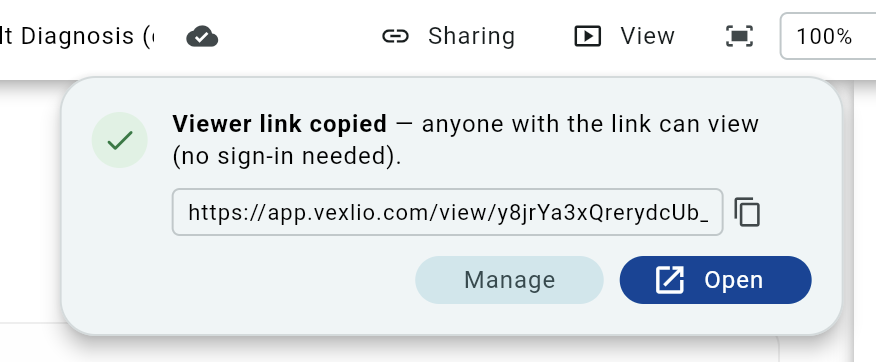
With your diagram saved, click Viewer link in the toolbar. Vexlio publishes the diagram and copies the URL to your clipboard right away, so the common case is a single click. You'll need to be signed in to publish, though the people you send the link to won't need an account.

Send the link
Paste it into email, Slack, a ticket, or a doc. It opens in any modern browser with no install and no sign-in wall, which is what makes it easy to send to clients or external stakeholders. The confirmation card also gives you Open to visit the published result exactly as your viewers will see it, and Manage to reach the sharing settings.
Pick what viewers can do (optional)
Open Sharing to choose between two levels. View lets people explore the diagram and nothing more. View & copy also lets them save their own copy into their Vexlio account, which is the right choice for templates and starting points you want others to build on. A copy is fully independent, so their edits never touch your original.
Publish again to push updates
After you edit a published diagram, the toolbar button marks that you have unpublished changes. Click Publish all changes to push them. The URL stays the same, so viewers keep using the link they already have and see the new version on their next load. This is the core benefit over exporting: one link that stays current, instead of a trail of attachments at different versions.
Embed it in your docs (optional)
Drop the published URL into an <iframe> and Notion,
Confluence, SharePoint, wikis, and LMS tools render the diagram inline,
interactivity and all. Append ?embed=1 for a chrome-free view
for embedding: it hides the View Mode menu.
The life of a published link
- Re-publishing keeps the link; deleting it doesn't. You can publish as many times as you like and the URL never changes. Deleting a link is permanent: the old URL stops working immediately for everyone, and publishing again afterwards produces a brand-new URL you can redistribute as you choose. Use it when you want to revoke access, not as a way to tidy up.
- Only the latest version exists. Publishing replaces the previous snapshot rather than adding to a history, so there's no rollback to an earlier published version. Keep anything you might need to return to in a separate drawing. Versioned rollback is on the roadmap.
- Free-plan links expire after 3 days. Viewers then get a page explaining the link is no longer active, and you can republish to generate a new one. Paid plans get links that never expire, which is what you want for anything embedded in documentation or shared long-term. See pricing for the details.
- Published links are unlisted. Each URL contains a long random ID that isn't guessable, and published diagrams aren't listed in any directory or index. That said, the link is the only thing standing between a diagram and whoever holds it, so treat it with care: anyone it's forwarded to can open it, and a URL pasted somewhere public is public.
Frequently asked questions
Keep going
- How to make an interactive diagram with popups — build something worth publishing, step by step.
- Interactive diagrams with popups — the feature in depth, with more use cases.
- Interactive process documentation — publishing SOPs and runbooks your team can explore.
- Vexlio user guide — the tools, UI, and productivity tips behind the canvas.